
The practical answer
Check a barcode or QR workflow in three stages: whether the symbol decodes, whether the returned text matches the expected payload, and whether that payload reaches the intended record. Test the installed label with the actual supported reader and profile. A successful beep does not prove correct identity or record access, and a working phone does not qualify every scanner.
The method, examples, and sources below explain the scope and checks.
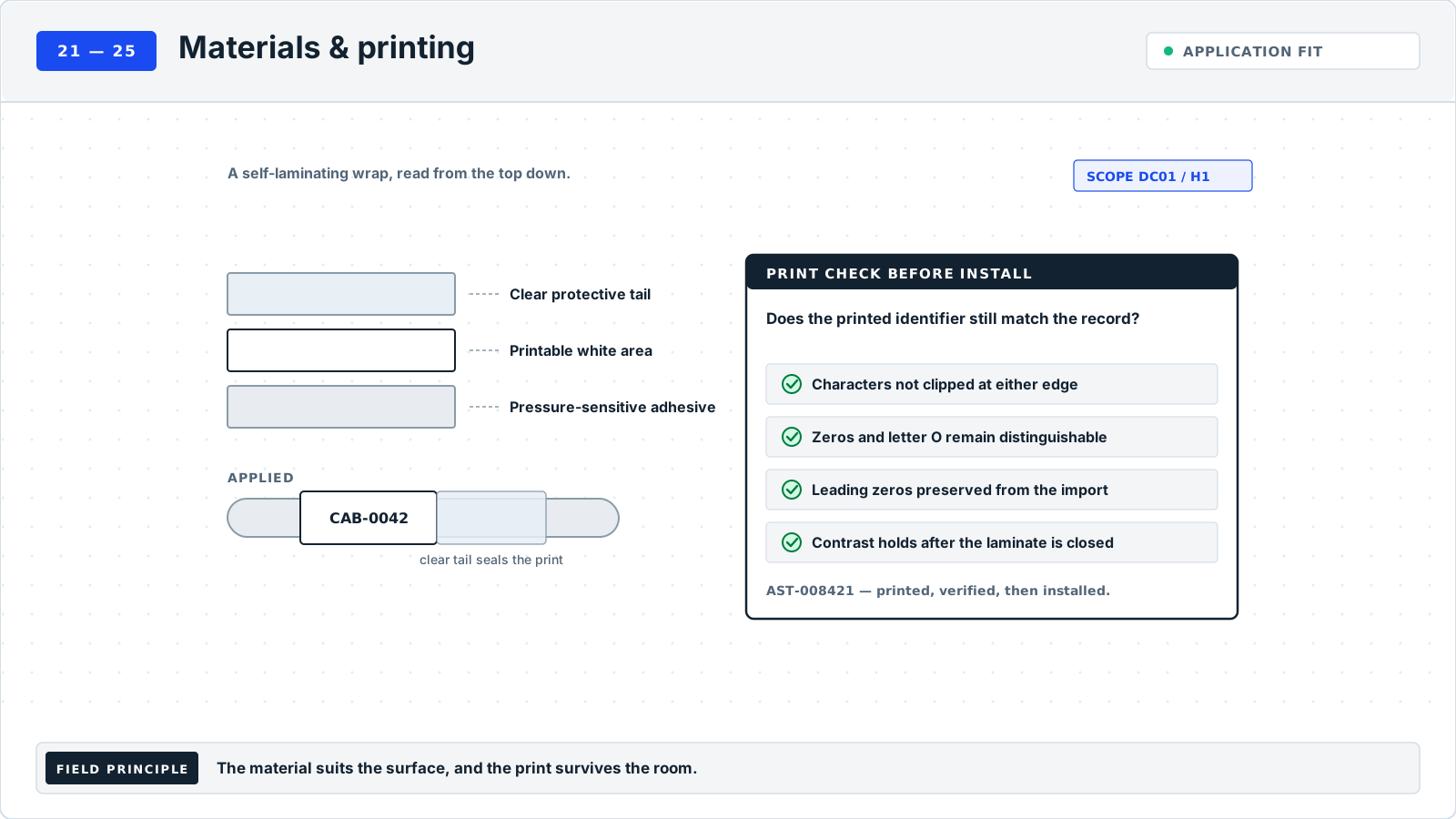
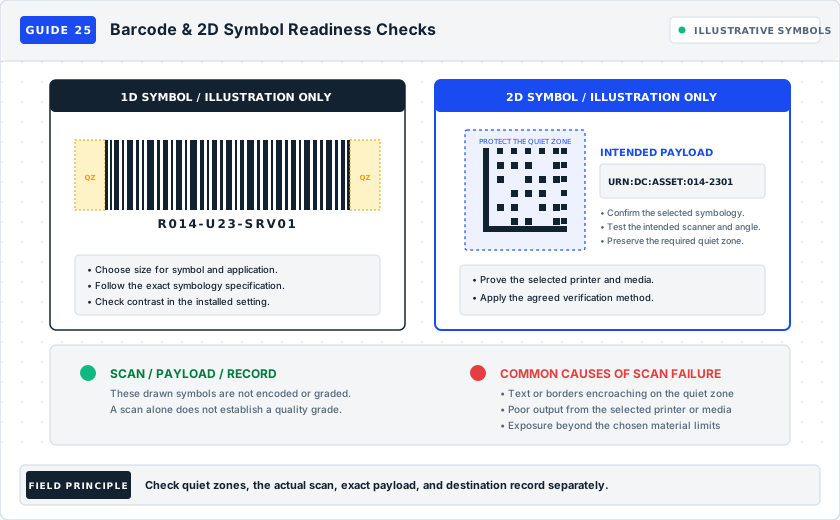
Examples are fictional local conventions. Unless another location is shown, the scope is DC01 / H1. Keep that scope with shortened identifiers.
When to use this guide#
Use this guide when a scanner struggles, a code works on one device only, the returned ID changes, or a successful scan opens the wrong asset. A scan sound alone does not establish identity.
What to gather#
Collect the exact expected payload, human-readable ID, symbol type, printed dimensions, scanner model/profile, target application, and the label's installed position. Include an authorized record-access test account where needed.
Source context#
Zebra's DataWedge documentation distinguishes scanning hardware, decoders, and data formatting; it also describes blank quiet zones around linear barcodes. The specified settings depend on the device and software version. Zebra DataWedge 11.1 barcode input.
Suggested method#
This is an editorial workflow to adapt to your site's approved process.
Choose a defined payload contract: for example, the complete asset ID used by an approved lookup process. Specify capitalization, punctuation, and whether scanner-added prefixes or suffixes are expected.
Compare the printed human ID and encoded value with the approved record. Inspect symbol boundaries, blank margins, contrast, wrinkles, and curvature using the chosen symbology's and printer's guidance.
Scan an actual applied sample using the intended device and profile. Capture the returned text so missing zeros, unexpected spaces, or added characters are visible.
Run a separate lookup test. Confirm the result identifies the intended object, then distinguish record mismatch, access denial, and unavailable service from a decoding failure.
Repeat with the intended working distance, lighting, orientation, and relevant devices. Record successful and failed attempts against your agreed acceptance criterion, then retain a readable text fallback.
Separate four outcomes that can sound like one failure#
Record whether the device acquired a symbol, what text it returned, whether the application accepted that text, and which record the application displayed. These four observations form the starting diagnosis. A device can decode a symbol successfully while an application rejects its output. An application can accept a value and resolve the wrong object. A scan sound alone leaves all those identity questions unanswered.
If no decode occurs, compare the symbol, reading position, and supported scanner configuration. If returned text differs from the expected payload, compare encoded data and output formatting. If text matches but the lookup fails, investigate the intended application, access, and record key. If a record opens but belongs to another object, hold the association for the records owner. Keep each result separate in the worksheet even if one person performs all the checks.
Preserve the human-readable identifier as an independent comparison point. If it is also unreadable or disputed, establish object identity through the site's records process before changing the code. A freshly printed machine symbol can make an unsupported identity error easier to repeat. Do not encode a guessed correction merely because it makes the scan test succeed.
Define exactly what the code is meant to carry#
Write the expected payload before generating a proof. Specify whether it is a stable ID, an approved lookup URL, or another defined value. Record the expected characters, capitalization, punctuation, and any permitted scanner output additions. Also record the expected lookup behavior: which application or environment receives the value and what object identity it should show. This gives the test an answer that can be compared rather than an impression that the scan worked.
For an ID payload, separate object identity from location and other changeable attributes unless the approved convention explicitly requires those fields. The physical text may provide location context while the machine value performs a stable lookup. If the payload contract includes several fields, define their order and separators so the receiving application does not have to guess where one ends and the next begins.
For a URL payload, record the intended host and route from the approved application design. Verify that the actual printed value matches that reference. A recognizable company name in visible text does not prove that the encoded destination is the approved one. Test the complete record identity after navigation, and distinguish a login screen or generic search page from the intended object record. Do not treat access denial as a reason to make the record publicly accessible.
The operational test structure here is Rackstamp's editorial workflow. Zebra's DataWedge documentation provides product-specific context for scanner hardware, supported decoders, and data formatting. Apply the guidance for the actual device and software version. Formal symbol-verification requirements, where applicable, belong to the selected symbology and project specification rather than to this operational worksheet. Zebra DataWedge barcode input.
Diagnose a symbol that does not decode#
Confirm the actual symbol type and whether the intended device and active profile support it. Record the profile actually used by the target application, since a different scanner utility may exercise another configuration. Use a known accepted comparison label with the same intended workflow if one is available. A successful comparison narrows the investigation, but it does not prove that every setting or every new symbol is acceptable.
Inspect the printed symbol and its immediate boundary. Look for clipping, folds, wrinkles, overprinted text, physical damage, and a position that hides part of the symbol around a curve. Consult the chosen symbology's and printer's instructions for sizing and clear-space requirements. This guide supplies no universal quiet-zone dimension or scanner distance because the relevant requirements depend on the symbol and hardware.
Compare an unapplied proof with the applied sample. If the flat proof reads and the installed sample does not, document the actual physical and viewing differences before changing software. If both fail, investigate generation, print quality, and decoder support using the applicable instructions. Keep the encoded value constant during a layout comparison so success cannot be attributed to an unnoticed data change.
Repeat observations at the working position with the intended device, lighting, orientation, and permitted access. Record the attempts and outcomes under the site's agreed acceptance plan. A single successful scan obtained only after moving the label into an unusual position does not describe ordinary use. Capture any dependence on a special angle or aid so the owner can decide whether to revise the label or formally include that condition in the workflow.
Diagnose correct decoding with incorrect returned text#
Capture the output in a permitted view that makes the complete returned value inspectable. Include unexpected spaces, prefixes, suffixes, and line endings in the evidence where relevant to the application contract. Compare it with both the expected payload and the value encoded in the approved label-generation record. This separates an incorrect generated value from an alteration introduced after decoding.
If the generation record is wrong, correct the source and reissue the affected symbols through the batch process. If the encoded value is right but the returned value differs, have the scanner or application owner inspect the active formatting path. Avoid adjusting a shared profile without knowing which other workflows depend on it. Record the approved configuration change and repeat the relevant workflows within the owner's defined review scope.
When only one device produces a different result, record that device's model, software, and profile reference rather than labeling the entire symbol population defective. Compare the same physical label under the intended workflows. Conversely, a phone reading a code correctly does not establish that an operations scanner supports the required symbol or output behavior. Acceptance belongs to the actual devices and applications used for the task.
Diagnose a correct payload that reaches the wrong place#
Record the exact lookup input and the identity displayed by the application. Distinguish no exact record, access denied, unavailable service, wrong environment, and wrong-object resolution. These states imply different owners and corrections. A temporary service outage does not establish that the symbol needs reprinting, while a code containing a superseded URL may require a payload or routing decision by the application owner.
Confirm that the displayed record represents the intended physical object. Compare its stable ID and appropriate supporting context, such as the verified rack position or recorded connection endpoints. Similar names and nearly identical digits are reasons to look carefully. Keep the wrong record reference as evidence while avoiding unnecessary capture of unrelated asset information. The worksheet should show what distinguished the records, not merely that one screen looked familiar.
Resolve duplicate or alias-related records through the relevant identity owner. Do not create a new record simply to make the scanned value return something. That action could duplicate an existing object under another key. If an approved alias or redirect is used, retain its decision reference and test the final resolved object. The physical payload, alias relationship, and active record each need a clear role.
Field case: a good desk proof fails in a crowded installed view#
This fictional case occurs in DC01 / H1 on asset AST-G25-301. The generated payload equals the human-readable ID, and a flat proof scans at the preparation desk. In the installed review, the normal scanner view includes the equipment supplier's separate symbol beside the site's asset label. The operator hears a scan tone and the application receives a value that is not AST-G25-301. Record SCN-G25-301 captures the actual returned value and both visible symbol locations.
The reviewer first establishes that the site's symbol contains the correct payload. A controlled scan directed at that symbol returns AST-G25-301 and reaches the intended record. The issue is therefore not immediately classified as poor print or a corrupted key. The reviewer records that the ordinary working view makes target selection ambiguous and refers the placement to the labeling owner.
On an approved representative arrangement, the owner evaluates a revised site-label position that preserves required manufacturer markings and allows the intended symbol to be selected under the approved device workflow. The reviewer repeats scans from the actual working view, captures the returned text, and confirms the displayed record each time according to the agreed acceptance plan. The original and revised positions remain linked to SCN-G25-301.
Closure records the accepted position, device/profile, observation conditions, and lookup evidence. It does not remove or cover the manufacturer's symbol simply to eliminate competition. The correction addresses the actual reading task and preserves the site's human-readable ID. Any other assets with similar adjacent symbols remain a separately defined review population rather than receiving an automatic pass from this one successful correction.
Variations for curved labels, multiple devices, and offline work#
For a curved application, include the actual construction and geometry in the proof. A larger symbol is not automatically a solution when it extends farther around the surface. Compare supported formats and placements while maintaining the verified payload, then observe the applied result. Use guide 22 when the marker's fit or available reading face is the limiting condition.
For a mixed device fleet, list the device/profile combinations within the operational scope. Decide which are required and which are informative comparisons before testing. A label accepted on one required device and failing on another remains unresolved for the full stated workflow. Keep results per combination so the owner can decide whether the correction belongs to print, placement, device configuration, or scope.
For authorized offline work, define what success means without a live lookup. A device may capture a correct ID while record resolution is pending until connection is restored. Record those states separately and define who reconciles queued observations with the current record. Do not mark a deferred lookup as a verified identity match simply because capture succeeded. Retain readable text so the operator can record the observed object through the approved offline process.
For labels that include both a symbol and visible destination information, verify both against the approved record. A stable machine ID can continue to resolve correctly while stale human-readable location text misdirects a technician. The scan test does not validate every printed field. Route any destination discrepancy through the normal label-to-record review and record whether reprinting one or both faces is required.
Make the test result useful for later failures#
Retain the exact payload contract, label-generation revision, symbol type, physical print reference, applied position, device/profile, observation conditions, returned values, and lookup results. Record the agreed acceptance criterion before the final decision. Evidence that says "five successful reads" needs to say where, with which device, and what each successful read established. It should not imply formal quality grading unless that separate verification was actually performed.
Keep failed attempts in the record along with successful ones. They can reveal a viewpoint or configuration dependence that a final screenshot hides. If a revision changes the symbol size, layout, stock, printer, device profile, or application route, assess which earlier evidence remains applicable and repeat the affected checks. The purpose is to maintain an understood operating path, not to collect an arbitrary number of screenshots.
For a physical correction, compare the installed replacement with its approved human-readable identity and encoded value, then confirm the intended lookup. For a records correction, retest the original physical code if it remains valid. For a configuration correction, record the approved profile version and the relevant device coverage. Close only the part actually verified, leaving access, service, or remaining device issues under their own owners.
Keep label identity distinct from application availability#
An operational record can move to another approved application without changing the physical object's stable identity. Before replacing a population of codes, have the application owner determine how the existing payload contract will be supported and what evidence is required for the transition. Test representative existing labels against the approved new lookup path and retain their resolved identities. If the decision requires new payloads, account for old and new physical copies and record the effective transition. A successful application migration should leave operations able to distinguish a valid existing identifier from a superseded navigation route.
Include the intended user's record view in the final lookup check. An administrator may see a complete record while the operations role receives a different permitted view or cannot reach the necessary identity context. Record what the actual authorized role can establish and refer missing functionality to the application owner. Do not broaden access merely to complete a labeling test. A clear pending access outcome is more accurate than approving a workflow solely from a privileged test session that the eventual operator will not use.
Worked example (fictional)#
Unless another site is named, the example scope is DC01 / H1.
HUMAN ID: AST-008421
ENCODED : AST-008421
RETURNED: AST-008421       -> Decode/payload match
LOOKUP  : AST-008412       -> Record mismatch; investigate

A successful decode can still produce the wrong lookup result.
The fictional lookup error illustrates why the two tests need separate outcomes. This diagram is not a scannable barcode.
Common mistakes#
- Approving a label from one desk-top scan.
- Changing scanner settings to conceal a poor symbol layout.
- Encoding a temporary location as though it were permanent asset identity.
Verification checklist#
Worksheet field dictionary#
Barcode and QR acceptance test sheet. The example-value column shows one fictional worksheet row vertically.
| Field | Meaning | Filled example value |
|---|---|---|
| Human ID | Visible complete object identifier. | AST-008421 |
| Expected payload | Exact encoded text. | AST-008421 |
| Symbol type | Barcode symbology selected. | QR Code |
| Print size | Symbol dimensions and margin reference. | 20 mm square; layout Q2 |
| Scanner/profile | Actual reading device and configuration. | Example imager / asset profile |
| Returned text | Captured scanner output. | AST-008421 |
| Scan result | Attempts and decoding observation. | 5 of 5; bench example only |
| Lookup result | Record identity or access outcome. | Wrong record AST-008412; review |
| Evidence | Proof and captured-output reference. | EX-Q25 |
| Owner | Person coordinating acceptance. | Example scan reviewer |
| Verification date | Date the test was observed. | 2026-09-12 |
Frequently asked questions#
Must the code contain a URL?#
No. A stable ID with an approved lookup can be enough. Use the payload your operational process supports.
Does this worksheet grade barcode quality?#
No. It records operational scan and lookup checks. Where a specification requires formal symbol verification, retain that separate result.
Why can one phone read a label that the issued scanner cannot?#
The two workflows may use different hardware, decoders, configurations, and output paths. Record each actual result and review the required operations device with its owner. The phone result is useful comparison evidence, not acceptance of the issued workflow.
Should we reprint when the record service is unavailable?#
First confirm the returned payload and the approved lookup route. If those match, record the service issue separately. Reprinting unchanged data does not resolve an unavailable application, and a temporary outage should not silently change the identity contract.
Can a code be accepted while access is pending?#
You can record completed print and payload checks while keeping lookup acceptance pending. State that boundary clearly and name the remaining owner. Do not describe the whole operational workflow as verified until its required checks are complete.
More worked label examples
Two additional ways to apply this guide. Keep the exact identifiers and relationships consistent with your own approved records.
GUIDE 25 / EXAMPLE 1
Separate a successful decode from a failed record lookup
The scanner returns the expected identifier, but the application has no current record for that exact key; the print is not automatically the cause.
SCOPE: DC01 / H1; asset AST-G25-101
LABEL FACE (SYMBOL SHOWN AS PLACEHOLDER)
+--------------------------+
| [MACHINE SYMBOL]         |
| AST-G25-101              |
+--------------------------+

EXPECTED PAYLOAD: AST-G25-101
SCANNER RETURN:   AST-G25-101  -> decode: MATCH
APPLICATION LOOKUP: no exact record -> lookup: FAIL

CHECK RECORD INDEX
Old alias AST-G25-0101 -> incorrect import key
Resolved exact key AST-G25-101 -> REC-G25-101
Retest: same scanned text -> intended asset record- Inspect the returned payload before changing print settings. Check the intended application, environment, permissions, and record key when decoding succeeds but navigation fails.
- Generate the real symbol using the selected symbology and verified payload. The bracketed symbol placeholder is explanatory text and is not a scannable barcode or QR code.
GUIDE 25 / EXAMPLE 2
Catch a scanner profile that alters the identifier
The encoded payload is correct, but a scanner formatting rule adds characters that break the exact record lookup.
SCOPE: DC01 / H1; cable CBL-G25-201
LABEL FACE: [MACHINE SYMBOL] [CBL-G25-201]
ENCODED PAYLOAD: CBL-G25-201

PROFILE SCN-G25-201 r1 RETURNS: ID:CBL-G25-201
LOOKUP EXPECTS:                CBL-G25-201
RESULT: decode obtained; payload mismatch; lookup fails

AFTER APPROVED PROFILE CORRECTION SCN-G25-201 r2
RETURNED TEXT: CBL-G25-201
LOOKUP: CON-G25-201 -> PNL-G25-201/P04 to SW-G25-201/P18

Scan evidence: EV-G25-201, actual label and service position
Profile decision: CFG-G25-201; both versions retained- Capture the scanner's actual returned characters, including prefixes, suffixes, spaces, and line endings. Confirm whether the receiving application expects any of them before changing the profile.
- After a profile change, test the actual label at the intended distance and angle and check the resolved record identity. If decoding itself fails, separately review symbol size, quiet space, print quality, and scanner support.
Sources and applicability
- Zebra: Barcode input documentation ↗
DataWedge 11.1 hardware, decoder, formatting, and quiet-zone context; payload/lookup workflow is editorial.
Read scope and linked guides
Planning guides and companion documents
- Choose a label printer for the work you actually do
- Choose barcodes, RFID, or AIM for the evidence you need
- Tag assets at intake so the register starts complete
- Device-class label placement review
- Label printer selection and trial plan
- Barcode, RFID and AIM technology pilot plan
- Asset intake tagging procedure