
Rackstamp, data center labeling field guide

THE RACKSTAMP WORKBENCH

One rack.
Fully documented.

See where the labels go. Connect them to the right records. Leave with a labeling pack you can make your own.

Interactive 3D example · Editable records · Free downloads

01 Explore02 Adapt03 Export
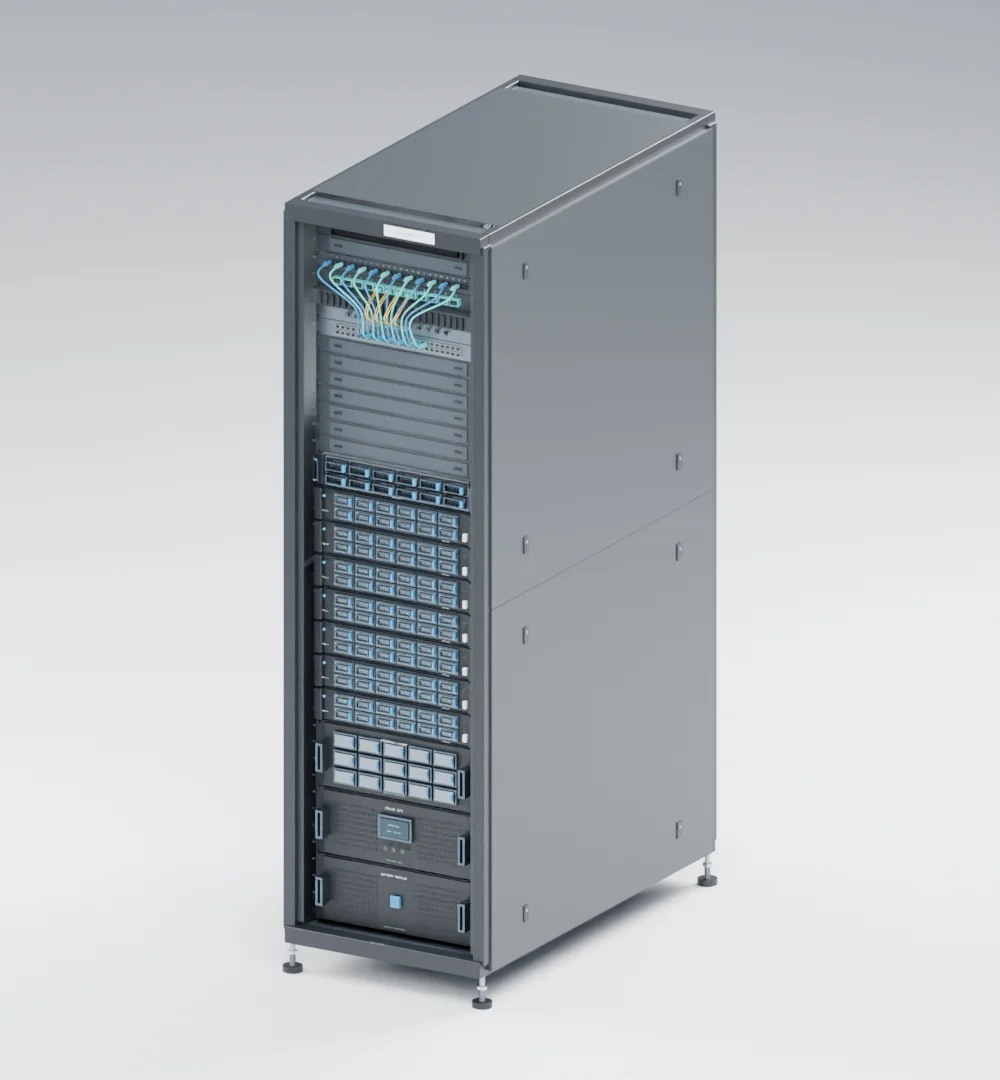
The DC42 42U server rack, rendered from its 3D model with its front door removed to reveal patching, servers, storage and power equipment.DC42 / 42U Explore in 3D ↗

Browse the library

56 resources
01Naming conventionsWe do not have a naming convention02Duplicate identifiersTwo objects have the same ID03Rack wayfindingI cannot find the correct rack04Front, rear & rack unitsFront, rear, and rack units disagree05Asset identity & locationMoving a device makes its identity confusing
06Cable endpointsI cannot identify the other cable end07Patch panels & portsPatch-panel and port labels do not match08Fiber trunks & breakoutsFiber trunks and breakout legs are ambiguous09Dense-bundle visibilityLabels disappear inside dense bundles10GPU cable stagingGPU cable bundles lose their installation sequence

Power & safety

11—15 · 33
11A/B feed identificationA and B feeds are easy to confuse12Circuit & disconnect markingsThe supplying circuit or disconnect is unclear13PDU outlet-to-PSU mappingPDU outlets cannot be matched to device power supplies14Grounding & bonding IDsGrounding and bonding connections cannot be traced15Asset IDs & safety labelsAsset stickers and safety labels get mixed up33Busway tap-offsNobody can tell which tap-off box feeds which rack

Cooling & facilities

16—20 · 31—32
16Pipe supply, return & flowCooling pipe supply, return, or flow is unclear17Liquid-cooling hose endpointsLiquid-cooling hoses lose their endpoint identity18Equipment & alarm namesFacility equipment names do not match alarm names19Pathways & penetrationsCable pathways cannot be matched to drawings20Colocation demarcationsCarrier, colo, and tenant circuit IDs disagree31Valve tags & isolation pointsIdentify cooling valves and isolation points32Cooling loops & unitsSeparate cooling loops and the units that serve them
21Label material failuresLabels peel, fade, or fail in service22Label fit & readabilityThe label does not fit or the text is too small23Print quality & alignmentPrint smears, clips, or shifts24Bulk label importsBulk imports corrupt or duplicate identifiers25Barcodes & QR codesA barcode or QR code will not scan reliably
26Physical label vs. recordThe physical label and system record disagree27Cable test IDsTest results use different cable IDs28Contractor handoffsContractor handoffs leave inconsistent labels29Moves, migrations & retirementMoves and retirements leave stale labels behind30Audit evidence & closureNo one can prove labels were checked
+Choose a label printer for the work you actually doCompare portable and desktop workflows, qualify the exact materials and software, and calculate cost from accepted labels before selecting a printer.+Choose barcodes, RFID, or AIM for the evidence you needSeparate asset inventory from connection detection, test the actual environment, and decide who turns observations into trusted records.+Create a cable-color legend people can useSeparate jacket color meaning from T568 pin assignments, inventory what each color already means, and publish a legend that works without relying on hue.+Plan a legacy-room relabeling programBuild a credible baseline, resolve unknowns through their owners, and release manageable waves with physical and record evidence.+Build a labeling budget and business caseCompare the actual cost of implementation and upkeep with conservative, evidence-based improvements in lookup and rework effort.+Data center labeling standards: build a project requirements mapWhich standards govern a data center label: TIA-606-D classes and editions, TIA-942, NFPA, OSHA, ASME and UL, and what each one leaves to you.+Check arc flash and electrical safety labels against their sourceConfirm a hazard label names the right equipment, carries every required element, and is still current, without transcribing or inventing a value.+Prepare labeling evidence for an audit or assessmentWork back from the control being tested: define the population, reconcile in both directions, and keep a dated exception log another reviewer can repeat.+Select label materials for the conditions at the labelSpecify from the label position rather than the room, separate the four jobs a construction performs, and check the limit on the deciding property.+Tag assets at intake so the register starts completeDecide where identity begins, choose an identifier that carries no changing facts, and make the first record at intake the authoritative one.+Sign aisles and rows so a stranger finds the right faceDerive aisle names from the grid, sign both ends of every row, name the face in words, and keep hazard signage out of the wayfinding system.+Label the PCI DSS scope boundary so the room matches the diagramFix the scope vocabulary once, label the demarcation rather than the device, and reconcile the register against the room in both directions.
V01Hazardous energy in data centers7:00 · Recognize electrical, mechanical, pressure, thermal, and stored-energy hazards in data centers with this narrated 3D lockout/tagout explainer.V02Lockout/tagout devices and how they work7:36 · See how safety padlocks, breaker clamps, hasps, valve devices, cable lockouts, and plug enclosures work in a data center lockout program.V03Group lockout and the group lockbox6:45 · Follow a group lockbox from isolation keys to personal locks, verification, shift changes, and release in this animated lockout/tagout explainer.V04Breaker panel lockout and backfeed6:41 · Understand breaker lockout boundaries, alternate supplies, backfeed, and electrical verification using a fictional data center panel example.V05Stored energy: springs, hydraulics, capacitors6:45 · Explore springs, hydraulic pressure, gravity, and capacitor charge, and why stored-energy control remains necessary after a supply is isolated.V06The lockout/tagout procedure, step by step8:51 · Follow an animated data center fan maintenance example through preparation, shutdown, isolation, verification, maintenance, and controlled restoration.V07Arc flash at the PDU: what the label is telling you4:02 · A narrated 3D explainer of arc flash at a floor PDU: what the arc flash label says, approach boundaries, de-energizing, risk controls, and arc-rated PPE.V08The Wrong Cable: How a Data Center Rack Goes Offline3:54 · One wrong cable takes eight servers offline in this fictional 3D scenario. See why endpoint checks and current records matter before a planned removal.V095 data center cable labeling mistakes and how to fix them3:16 · Fix five common data center cable labeling mistakes: missing end labels, vague IDs, mixed endpoint wording, unreadable print, and outdated records.V10Data center cable labeling: identify both ends13:36 · Learn to identify both cable ends, match rack and port assignments, handle label mismatches, and maintain records with a narrated video and review worksheet.V11What's inside a 42U server rack?3:12 · Explore a 42U server rack in a narrated 3D tour: rack units, processors, memory, storage, networking, cooling, cabling, PDUs, and UPS backup.